
Contents
The Spotfire Streaming Adapter for Thomson Reuters Enterprise Platform for Real-Time Subscribe (the TREP-RT Subscribing Adapter) allows a StreamBase application to receive market data from a Thomson Reuters RMDS 6 server.
This adapter supports the following Thomson Reuters message models:
-
MarketPrice
-
MarketByOrder
-
MarketByPrice
-
MarketMaker
-
SymbolList
-
ServiceProviderStatus
The MarketPrice model consists of a flat set of key-value pairs. The adapter emits a tuple on its market data output port for each MarketPrice or ServiceProviderStatus message received. The other models are hierarchical, containing an arbitrary number of elements, each consisting of a fixed set of key-value pairs. For these models, the adapter emits a tuple for each element affected (added, removed, or modified) by a Reuters message.
The adapter supports both initial (static) and dynamic subscriptions. Initial subscriptions are specified within an optional initial subscriptions file, which is processed when the adapter starts. Later, items can be subscribed to, or unsubscribed from, by enqueuing tuples to the adapter's dynamic subscription input port. Snapshots, which return an image but no subsequent updates, can be requested either statically or dynamically.
The adapter's set of active subscriptions can be retrieved by enqueuing a tuple to the adapter's information query input port. When queried, the adapter emits a stream of tuples representing the set of active subscriptions on its information query output port. For RMDS 6, the info query mechanism can be used to retrieve the set of fields in the loaded data dictionary.
The adapter emits tuples on its event output port to convey important events to the StreamBase application, such as login success or failure, dictionary loading activity, connection and service up/down events, and item status messages. Event tuples contain fields that specify the event type, object, action, status, and description.
The adapter is configured through a collection of properties set in the adapter's Properties view within StreamBase Studio. Properties specify, among other things, the Reuters message model being used by the adapter instance, the RFA session name, optional RFA configuration and initial subscription files, and dictionary and login information.
The optional RFA configuration (preferences) file defines RFA namespaces, sessions, and connections. It can be created using the StreamBase RFA/Java Configuration Wizard provided with StreamBase Studio or the Reuters Configuration Editor included in the Reuters Foundation API - Java Edition SDK. If a preferences file is provided, its contents are imported into the Java preferences database and is subsequently accessed by the RFA/Java library. If other RFA client applications have been used on the system, it may be possible to reuse the existing preferences, in which case the preferences file name can be left blank.
This section describes the properties you can set for this adapter, using the various tabs of the Properties view in StreamBase Studio.
Name: Use this required field to specify or change the name of this instance of this component. The name must be unique within the current EventFlow module. The name can contain alphanumeric characters, underscores, and escaped special characters. Special characters can be escaped as described in Identifier Naming Rules. The first character must be alphabetic or an underscore.
Adapter: A read-only field that shows the formal name of the adapter.
Class name: Shows the fully qualified class name that implements the functionality of this adapter. If you need to reference this class name elsewhere in your application, you can right-click this field and select Copy from the context menu to place the full class name in the system clipboard.
Start options: This field provides a link to the Cluster Aware tab, where you configure the conditions under which this adapter starts.
Enable Error Output Port: Select this checkbox to add an Error Port to this component. In the EventFlow canvas, the Error Port shows as a red output port, always the last port for the component. See Using Error Ports to learn about Error Ports.
Description: Optionally, enter text to briefly describe the purpose and function of the component. In the EventFlow Editor canvas, you can see the description by pressing Ctrl while the component's tooltip is displayed.
This section describes the properties on the Adapter Properties tab in the Properties view for the Thomson Reuters TREP-RT Subscribing adapter.
| Property | Description |
|---|---|
| Message Model | The Thomson Reuters Message Model to be used by this instance of the adapter: MarketPrice, MarketByOrder, MarketByPrice, MarketMaker, SymbolList, and ServiceProviderStatus. |
| RFA Configuration File | The name of the RFA configuration (preferences) file. This file may not be required if the preferences from another RFA client application are being reused. If specified, the contents of this file is imported into the Java preferences database when the adapter starts. |
| RFA Session Name | The session name within the Java preferences database to use in accessing the Thomson Reuters RMDS server. The session name must include a namespace prefix and a double colon delimiter (::). |
| Initial Subscription File | The name of the file containing zero or more subscription requests processed when the adapter starts. An example initial subscription file is provided with the adapter sample. The example file explains the syntax of a subscription request and contains several commented-out subscriptions. |
| Disable Market Price View Requests | When enabled while using the Market Price message model, the OMM View Request optimization for subscribing to a selected set of fields is disabled. Normally, the adapter uses view requests to subscribe to only the fields of interest—those present in the adapter's market data output schema. The resulting market price messages are smaller and more efficient. If the Reuters server is not licensed for view requests, market price subscriptions are rejected. |
| Username | The username value used to log in to the Reuters server and/or enforce entitlements. |
| Position | The position value used to log in to the Reuters server and/or enforce entitlements. |
| Application | The application value used to log in to the Reuters server and/or enforce entitlements. |
| Report Missing Output Schema Fields | If enabled, the default, the adapter logs a one-time warning for each field in a Thomson Reuters message that is not present in the market data output schema. |
| Include AttribInfo In All Updates | If enabled, each subscription will receive AttribInfo for all update and refresh messages. |
| Log Level | Controls the level of verbosity the adapter uses to send notifications to the console. This setting can be higher than the containing application's log level. If set lower, the system log level is used. Available values, in increasing order of verbosity, are: OFF, ERROR, WARN, INFO, DEBUG, TRACE. |
This section describes the Data Dictionaries tab in the Properties view for the Thomson Reuters TREP-RT Subscribing adapter. The adapter can be configured to download dictionaries and/or load them from the local file system. When the adapter processes a market data message, it uses the "best" available dictionary to parse the message:
-
A dictionary downloaded from the Thomson Reuters service whose name matches that in the message.
-
A dictionary loaded from a local file.
-
A dictionary downloaded from a Thomson Reuters service whose name is different than that in the message.
Multiple adapter instances in a StreamBase application attempt to share both downloaded and locally-loaded dictionaries. Thus, the dictionary for a specific Thomson Reuters service will be downloaded just once and will be shared by all the adapter instances that use it. Each uniquely-named local dictionary file is loaded just once as well.
| Property | Description |
|---|---|
| Download Data Dictionary |
When set, data dictionaries are downloaded from the Reuters server. Dictionaries are downloaded from all available Reuters services that supply them. Later, when processing an OMM message containing market data, the adapter uses the "best available" dictionary, prioritized as follows: 1) dictionary downloaded from the same Reuters service as the OMM message; 2) dictionary loaded from the local file system; 3) dictionary downloaded from a different Reuters service than the OMM message. |
| Download Service(s) |
This parameter can be used to restrict the set of services from which data dictionaries are down loaded. It contains a comma-delimited list of Thomson Reuters service names from which dictionaries are downloaded. If unspecified, the adapter attempts to download dictionaries from all available services. |
| Field Dictionary File | The file name of the field data dictionary. A locally-loaded dictionary is used only when a dictionary has not been downloaded for the Reuters service from which the OMM message was received. |
| Enumeration Dictionary File | The file name of the enumeration data dictionary. A locally-loaded dictionary is used only when a dictionary has not been downloaded for the Reuters service from which the OMM message was received. |
This section describes the properties on the Tuple Properties tab in the Properties view for the Thomson Reuters TREP-RT Subscribing adapter.
| Property | Description |
|---|---|
| Send Thin Tuples | When set, sends one tuple per field in the Thomson Reuters message. This option is available for the MarketPrice message model only. |
| Send Unchanged Fields As Null | When set, fields not present in a MarketPrice update message are sent as null in the resulting market data tuple. Otherwise, the previous value of that field is sent in the tuple.
NoteWhen this setting is disabled, the adapter's memory usage increases with the number of subscribed RICs. |
| Send Image on Duplicate Subscribe | When set, the adapter emits an image tuple when a subscription is received for an item that has already been subscribed to. |
| Send Enum Field Display Values | When set, Reuters ENUMERATION fields are emitted as strings using the "display" value. For example, USD if CURRENCY contains 840.
|
| Include Field List Number Field | When set and the adapter is configured for the MarketPrice message model, a FieldListNo field is added to the output schema to receive the field list number. |
| Include OMM Message SeqNum Field | When set, SeqNum field is added to the output schema. This field contains the sequence number from the OMM message or null if no sequence number was present.
|
| Include OMM Response Type Field | When set, a ResponseType string field is added to the output schema. For refresh messages, the field contains either SOLICITED or UNSOLICITED. For update messages, the field contains CLOSING_RUN, CORRECTION, MARKET_DIGEST, MULTIPLE, NEWS_ALERT, ORDER_INDICATION, QUOTE, QUOTES_TRADE, TRADE, UNSPECIFIED, VERIFY, or VOLUME_ALERT.
|
| Include Subscribe Pass-Thru Field | When set, a field named PassThru is expected in the schema of the DynamicSubscribe input port, and a field of the same type is added to the MarketData output
port. There are no constraints on the PassThru field's type. The value received in this field from the subscription tuple is placed in each market data tuple emitted as
a result of that subscription. A null is placed in the PassThru field of market data tuples originating from static subscriptions.
|
| Derive Update Type from Market Feed Data | When enabled, this property causes the adapter to derive the specific update message type from the raw market feed data. This
might be used when the useMarketfeedUpdateType property in the RFA configuration file does not function as expected in certain Thomson Reuters environments.
|
| Output Info Query as List | When set the output of the Info Query stream will be a single tuple for each query info input tuple. The output tuple will be a list having one entry for each subscription or dictionary item. Each subscription or dictionary item will be a list of info strings. |
| Output Market Data as List | When set the output of the Market Data stream will be a single tuple with a list of market data for each subscription refresh, update, or delete message received. |
This section describes the Field Mapping tab in the Properties view for the Thomson Reuters TREP-RT Subscribing adapter.
The system will automatically map all fields for you if the field name ends with "_as_string". An example of this would be if you add a field name "BID_as_string" as a string to the schema, the system will convert the Reuters "BID" field to the string based representation of that field. This is useful for prices that come in as fractional prices such as "88 4/32".
| Property | Description |
|---|---|
| Field Map | A two-column table containing zero or more rows, each of which specifies a StreamBase-to-Reuters field mapping. The purpose
of this property is twofold. It allows the name of a StreamBase field to be different than that of the Thomson Reuters field
from which the StreamBase field is populated. And it allows two or more StreamBase fields, potentially of different types,
to be populated from a single Thomson Reuters field. A common use for field mapping is to retrieve both the string and double
representation of a Thomson Reuters field that contains a fractional price, such as 100 3/256.
|
This section describes the properties on the Debugging tab in the Properties view for the Thomson Reuters TREP-RT Subscribing adapter.
| Property | Description |
|---|---|
| Display Messages Sent | This property is primarily a diagnostic feature. When set, the adapter displays the contents of messages it sends to the Thomson Reuters server. |
| Display Messages Received | This property is primarily a diagnostic feature. When set, the adapter displays the contents of messages it receives from the Thomson Reuters server. |
| Display Field Dictionary | Displays the contents of downloaded field dictionaries when the adapter is configured for an RMDS 6 message model. |
| Display Enumeration Dictionary | Displays the contents of downloaded enumeration dictionaries when the adapter is configured for an RMDS 6 message model. |
| Display Already Subscribed Messages At Debug Level | Display already-subscribed messages, normally logged at INFO level, at DEBUG level instead. |
| Message Display Filter | This property is primarily a diagnostic feature. If blank, every Thomson Reuters message is subject to display based on the
setting of the previous two properties. Otherwise, the filter is a set of message model names delimited with the pipe symbol
( | ). Valid values include: LOGIN, DIRECTORY, DICTIONARY, MARKET_PRICE, MARKET_BY_ORDER, MARKET_BY_PRICE, MARKET_MAKER, and SYMBOL_LIST. Thus, for example, to see all Login and MarketPrice OMM messages received, set this property to LOGIN|MARKET_PRICE and set Display Reuters Messages Received to true.
|
Use the Edit Schema tab to specify the schema of the market data output for this adapter.
ServiceProviderStatus messages may contain OMM MapEntries. These are sent to the output port as Tuple types in thin tuple mode. This tab should be used to specify the schema for the Tuple type values for ServiceProviderStatus in thin tuple mode.
For general instructions on using the Edit Schema tab, see Defining Input Streams.
Use the settings in this tab to enable this operator or adapter for runtime start and stop conditions in a multi-node cluster. During initial development of the fragment that contains this operator or adapter, and for maximum compatibility with releases before 10.5.0, leave the Cluster start policy control in its default setting, Start with module.
Cluster awareness is an advanced topic that requires an understanding of StreamBase Runtime architecture features, including clusters, quorums, availability zones, and partitions. See Cluster Awareness Tab Settings on the Using Cluster Awareness page for instructions on configuring this tab.
Use the Concurrency tab to specify parallel regions for this instance of this component, or multiplicity options, or both. The Concurrency tab settings are described in Concurrency Options, and dispatch styles are described in Dispatch Styles.
Caution
Concurrency settings are not suitable for every application, and using these settings requires a thorough analysis of your application. For details, see Execution Order and Concurrency, which includes important guidelines for using the concurrency options.
This section demonstrates how to use the Thomson Reuters TREP-RT Subscribing adapter within a StreamBase application and describes the use of the adapter's ports. As shown in the EventFlow diagram below (from this adapter's sample application), the adapter uses two input ports and three output ports to communicate with the surrounding application. As with other Spotfire Streaming adapters and operators, you can optionally enable an Error Output Port, as described in Using Error Ports and Error Streams.
Note
In this adapter's sample application, the adapter's input and output ports are connected directly to externally-visible input and output streams. However, in more complex applications these ports will typically be connected to internal StreamBase operators.
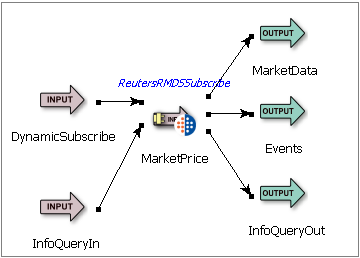 |
The Thomson Reuters TREP-RT Subscribing adapter's ports are used as follows:
-
DynamicSubscribe (input): Tuples enqueued on this port cause the adapter to subscribe to, or unsubscribe from, items after the adapter has started. Initial subscriptions (those processed during startup from entries in the intial subscriptions file) can later be unsubscribed from using this port. The schema of the DynamicSubscribe port is derived from the upstream operator or stream and must have the following fields:
-
Service, string: specifies the Reuters service to subscribe to or unsubscribe from.
-
Item, string: specifies the item to subscribe to or unsubscribe from.
-
Subscribe, bool: if true, results in a new subscription. Note that the adapter treats bool fields containing null as false. If both Subscribe and Snapshot are false, unsubscribes.
-
Snapshot, bool: if true and Subscribe is false, requests an image with no subsequent updates.
-
PassThru, any type: must be present when the
Include Subscribe Pass-Thru Fieldproperty is enabled. A corresponding field is added to the schema of theMarketDataoutput port. The value received in this field is placed in each market data tuple emitted as a result of that subscription.
-
-
InfoQueryIn (input): Tuples enqueued on this port request information from the adapter. The adapter provides the requested information by emitting tuples on its InfoQueryOut port. The InfoQueryIn port has the following fields:
-
Command, string: accepts a command specifying the type of metadata being requested. Valid commands include:
-
ListSubscriptions: returns the current set of active subscriptions.
-
DumpDictionary: returns the contents of the loaded field dictionary. If multiple dictionaries are loaded, use the Param field to specify the Reuters service name used to load the dictionary, or
nullto dump the dictionary loaded from the local file system.
-
-
Param, string: accepts a command-specific parameter value. Currently, only the DumpDictionary command uses a parameter, which provides the service name used to download the dictionary, or
nullto dump a locally-loaded dictionary. -
Tag, string: this value is echoed in each tuple emitted from the information query output port in response to a command, allowing responses to be matched with commands.
-
-
MarketData (output): This is the adapter's primary output port. The adapter emits tuples on this port when it receives Reuters market data messages. This section describes the schema usage for the market data port, and describes how and when the adapter emits market data tuples.
The market data port's schema consists of both market data and metadata fields. Market data fields are entered via Studio's Edit Schema tab, and their names must match those in the data dictionary. The adapter adds the following metadata fields to the market data output schema:
-
MessageType, string: contains
REFRESH,UPDATE,UNSOLICITED_IMAGE,CORRECTION,CLOSING_RUN, orSTATUS, depending upon the type of Reuters message that generated the tuple. -
Service, string: contains the Reuters service name.
-
Item, string: contains the item name.
-
RefreshComplete, boolean, MarketByOrder, MarketByPrice, and MarketMaker only: set to
truein an item's last refresh tuple,falsein all other refresh tuples, andnullfor non-refresh tuples. NOTE: This field is removed when Market Data As List option is selected and a single tuple will be emitted with a list of market data. -
Action, string, MarketByOrder, MarketByPrice, and MarketMaker only: contains
ADD,DELETE, orUPDATEto indicate the action occurring for the specific entry in the order book, market depth, or market maker table. -
Key, string, for MarketByOrder, MarketByPrice, and MarketMaker only: contains a unique identifier for the entry in the order book, market depth, or market maker table.
-
StreamState, string: for status and refresh messages, contains one of the following values to convey the item's current stream state:
-
UNSPECIFIED
-
OPEN
-
NONSTREAMING
-
CLOSED_RECOVER
-
CLOSED
-
REDIRECT
-
-
DataState, string: for status and refresh messages, contains one of the following values to convey the item's current data state:
-
UNSPECIFIED
-
OK
-
SUSPECT
-
-
StatusCode, string: contains one of the following values to convey the item's current status:
-
NONE
-
NOT_FOUND
-
TIMEOUT
-
NOT_ENTITLED
-
INVALID_ARGUMENT
-
USAGE_ERROR
-
PREEMPTED
-
JIT_CONFLATION_STARTED
-
REALTIME_RESUMED
-
FAILOVER_STARTED
-
FAILOVER_COMPLETED
-
GAP_DETECTED
-
NO_RESOURCES
-
TOO_MANY_ITEMS
-
ALREADY_OPEN
-
SOURCE_UNKNOWN
-
NOT_OPEN
-
-
StatusText, string: contains a human-readable description of a item's current status.
-
PassThru, any type: contains the value from the corresponding field of the dynamic subscribe tuple, or
nullif the market data message was received as the result of a static subscription. -
SPS_DATA metadata fields: metadata fields that are added to fields in the output schema for SPS_DATA in ServiceProviderStatus message models:
-
Action, string: metadata field used to pass Action value in SPS_DATA OMM Map entries.
-
Key, string: metadata field used to pass Key value in SPS_DATA OMM Map entries.
-
When configured to send thin tuples, the adapter adds the following fields to the market data output schema:
-
Fid, int: contains the FID of the Reuters message field.
-
FidName, string(30): contains the FID acronym (e.g., "BID") of the Reuters message field.
-
ValueType, string(10): contains the StreamBase data type used to hold the field value: int, double, string, timestamp, or blob.
-
IntValue, int: contains the field value for Reuters fields of type INTEGER. In addition, Reuters ENUMERATED field values are conveyed in this field when the adapter's "Send Enum Field Display Values" property is disabled.
-
LongValue, long: contains the field value for Reuters fields of type LONG.
-
DoubleValue, double: contains the field value for Reuters fields of type PRICE.
-
StringValue, double: contains the field value for Reuters fields of type ALPHANUMERIC. In addition, Reuters DATE, TIME, and TIME_SECONDS field values are conveyed in this field if the adapter is unable convert the data/time value to a StreamBase timestamp. Finally, Reuters ENUMERATED field values are conveyed in this field when the adapter's "Send Enum Field Display Values" property is enabled.
-
TimestampValue, timestamp: contains the field value for Reuters fields of type DATE, TIME, or TIME_SECONDS.
-
TupleValue, Tuple: contains the contents of MapEntry fields within OMM Maps in the Reuter messages. Each MapEntry in the message is sent out in a separate thin tuple.
-
BlobValue, blob: contains the field value for Reuters fields of type BINARY.
When configured to send Market Data as a List, the adapter changes the market data output schema:
-
Market Data, List: Contains a list of fields that are repeating and not considered well defined summary fields.
The market data fields present in the market data schema, and the frequency and method with which the adapter emits tuples on this port, vary with the message model the adapter is configured for.
-
MarketPrice is used to provide access to trades and quotes from exchanges. The data is structured as field-value pairs, and the adapter emits a single tuple for each OMM message it receives. The first tuple emitted for an item contains the item's initial image (
MessageType=REFRESH). The adapter subsequently emits update tuples (MessageType=UPDATE) as market information for that item changes. The adapter can be configured to set unchanged fields in update tuples tonullor to the field's previous value. -
MarketByOrder provides access to full order books. An order book consists of summary information, such as currency, which applies to all orders in the book, along with a set of zero or more orders. When an application subscribes to a new item, the adapter retrieves the initial order book contents through a set of OMM refresh messages. Upon retrieving the entire order book, the adapter emits a set of refresh tuples (
MessageType=REFRESH), one for each order in the book. If output market data as list is selected, a single tuple is emitted with a list of market data. The adapter then processes OMM messages containing changes to orders in the book, each of which results in an update tuple (MessageType=UPDATE). The specific action—ADD,DELETE, orUPDATE—is conveyed in theActionmetadata field. An order's unique identifier is conveyed in theKeymetadata field. Summary information appears in every refresh and update tuple.The MarketByOrder data fields typically available are:
-
Permission information (PROD_PERM)
-
Currency of the orders (CURRENCY)
-
Trade Units for the precision for which order prices are set (TRD_UNITS)
-
Market State (MKT_ST_IND)
-
Exchange Identifier on which the orders were placed (RDN_EXCHD2)
-
Price Ranking Rules (PR_RNK_RUL)
-
Order Ranking Rules (OR_RNK_RUL)
-
Order Price and Side (BID and ASK, or ORDER_PRC and ORDER_SIDE)
-
Order Size (BIDSIZE, ASKSIZE, or ORDER_SIZE)
-
Price Qualifiers (PRC_QL_CD, PRC_QL2)
-
Market Maker Identifier (MKT_MKR_ID or MMID)
-
Quote Time (QUOTIM_MS)
-
-
MarketByPrice provides access to market depth information—that is, to Level II data that is aggregated by price and side. The mechanics of tuple emission is identical to that for MarketByOrder. The adapter processes a set of OMM refresh messages to retrieve the full market depth information for an item, emits a refresh tuple (
MessageType=REFRESH) for each order, then emits update tuples (MessageType=UPDATE) as market depth changes for that item. TheActionandKeymetadata fields work identically as for the MarketByOrder message model, and summary information appears in all tuples.The MarketByPrice data fields typically available are:
-
Permission information (PROD_PERM)
-
Currency of the orders (CURRENCY)
-
Trade Units for the precision for which order prices are set (TRD_UNITS)
-
Market State (MKT_ST_IND)
-
Exchange Identifier on which the orders were placed (RDN_EXCHD2)
-
Price Ranking Rules (PR_RNK_RUL)
-
Order Price and Side (BID and ASK, or ORDER_PRC and ORDER_SIDE)
-
Order Size (BIDSIZE, ASKSIZE, or ORDER_SIZE)
-
Number of aggregated orders (NO_ORD)
-
Quote Time (QUOTIM_MS)
-
-
MarketMaker provides access to market maker quotes and trade information. The mechanics of tuple emission is identical to that for MarketByOrder and MarketByPrice.
The MarketMaker data fields typically available are:
-
Permission information (PROD_PERM)
-
Currency of the orders (CURRENCY)
-
Trade Units for the precision for which order prices are set (TRD_UNITS)
-
Market State (MKT_ST_IND)
-
Exchange Identifier on which the orders were placed (RDN_EXCHD2)
-
Price Ranking Rules (PR_RNK_RUL)
-
Bid (BID)
-
Ask (ASK)
-
Bid Size (BIDSIZE)
-
Ask Size (ASKSIZE)
-
Market Source (MKT_SOURCE)
-
Market Maker Name (MKT_MKR_NM)
-
Price Qualifiers (PRC_QL_CD and PRC_QL2)
-
Quote Time (QUOTIM_MS)
-
-
Symbol List provides a mechanism to retrieve all the symbols available on an exchange. For example, you can subscribe to
0#ARCAto retrieve the set of symbols available on the ARCA exchange.The Symbol List data fields typically available are:
-
Permission information (PROD_PERM)
-
The symbol provided by the exchange (PROV_SYMB)
-
-
ServiceProviderStatus is a Reuters internal message model that is used to pass information pertinent to the health of a service provider.
-
-
Events (output): The adapter emits tuples from this port when significant events occur, such as when a login succeeds or fails, when a data dictionary is loaded, when Reuters connections and services go up and down, and when the adapter is told an item is closed. The schema for this port has the following fields:
-
EventType, string: returns one of the following values to convey the type of event:
-
Connection
-
Dictionary
-
Directory
-
Item
-
Login
-
Service
-
Suspend/Resume
-
UserInput
-
-
Object, string: returns an event type-specific value, such as the connection or service name that went up or down, the dictionary file name that was loaded, or the user input that was rejected.
-
Action, string: returns an action associated with the event Type and Object, such as
LoadedorFailed to loadafter a dictionary load attempt. -
StreamState, string: returns the stream state returned in an OMM message. Refer to the description of the StreamState field in the Market Data port for a list of the possible values.
-
DataState, string: returns the data state returned in an OMM message. Refer to the description of the DataState field in the Market Data port for a list of the possible values.
-
StatusCode, string: returns a code to convey status about the event. Refer to the description of the StatusCode field in the Market Data port for a list of the possible values.
-
StatusText, string: contains a human-readable description of a connection, service or item's current status.
-
ItemName, string: returns the item name associated with the event.
-
Info, string: Returns a human-readable description of the event.
-
-
InfoQueryOut (output): The adapter emits tuples on this port in response to information query commands. The InfoQueryOut port has the following schema:
When Output Info Query as List IS NOT checked:
-
Done, bool: Set to
falsefor all but the last tuple emitted in response to a specific command. The final (marker) tuple has Done set totrueand all other fields set tonull. -
Command, string: returns the command value specified in the corresponding information query request tuple.
-
Param, string: returns the parameter value specified in the corresponding information query request tuple.
-
Tag, string: returns the tag value specified in the corresponding information query request tuple.
-
Info1-Info5, string: returns one or more command-specific values. The description of the InfoQueryIn stream above lists the information returned for each command.
When Output Info Query as List IS checked:
-
Command, string: returns the command value specified in the corresponding information query request tuple.
-
Param, string: returns the parameter value specified in the corresponding information query request tuple.
-
Tag, string: returns the tag value specified in the corresponding information query request tuple.
-
Info, List<List<String>>: returns a list of lists of command-specific values. The description of the InfoQueryIn stream above lists the information returned for each command.
-
Add an instance of the adapter to a new StreamBase EventFlow application as follows:
-
Within StreamBase Studio, create a project, including an empty StreamBase EventFlow Application file, which will host the adapter.
-
Import into the project the sample RFA configuration file,
rfa-config.xml, which is located instreambase-install-dir/sample/adapter/embedded/reuters-rmds-subserverListandportNumber) or RTIC (daemon,network, andservice) parameters to match the Reuters infrastructure at your site. Take note of the namespace and session names, as they will be used below. In the configuration file included in the sample, these values areSBSubscribeNamespaceandSBSubscribeRFA6Session, respectively. -
From the Global Adapters drawer of the Palette view, drag a ReutersRMDSSubscribe component to the canvas.
-
Double-click the adapter icon, and in the Properties view, select the Adapter Settings tab.
-
Select a Reuters Message Model from the dropdown.
-
In the RFA Configuration File field's drop-down list, select the RFA Configuration File you imported into the project above.
-
In the RFA Session Name field, enter the namespace and session names, delimited by a double colon (
::) in the RFA Session Name text entry box. For example, enterSBSubscribeNamespace::SBSubscribeSession. -
If you will be downloading data dictionaries from the Reuters server, mark the Download Data Dictionary check box (for MarketFeed, you must edit the RFA preferences file, rfa-config.xml, to enable dictionary downloading). If not downloading, enter the names of the Field and Enumeration dictionary files. Note that sample versions of these files are included in the adapter in
streambase-install-dir/sample/adapter/embedded/reuters-rmds-sub/RDMFieldDictionaryappendix_afor MarketFeed) andstreambase-install-dir/sample/adapter/embedded/reuters-rmds-sub/enumtype-rmds6.def -
If you wish to have the adapter subscribe to one or more items when it starts, you can specify an Initial Subscriptions File Name in the dropdown. A sample file is available for import into your project in
streambase-install-dir/sample/adapter/embedded/reuters-rmds-sub/initial_subscriptions.txt. -
Enter Username, Position, and Application values as necessary for accessing the Reuters server at your site. Note that at many sites one or more of these parameters are optional and can be left blank.
-
By default, the adapter, in processing Market Price update messages, sends
nullin unchanged tuple fields. Uncheck Send Unchanged Fields as Null to have the adapter send the previous value of such fields. -
The last three adapter properties—Display OMM Messages Sent and Received, and OMM Message Display Filter—are used for debugging and should typically be left with their default, empty values.
-
Connect Input and Output Streams to the adapter's two input and three output ports.
-
Configure the schemas of the two input ports and add market data fields to the adapter's primary (MarketData) output port. (The schemas of the Events and InfoQueryOut output ports are set automatically by the adapter, as are the metadata fields of the MarketData output port.) The specific fields required in the two input schemas are specified above in the descriptions of the DynamicSubscribe and InfoQueryIn ports. The adapter guides you through this process, displaying Typecheck Errors when an expected field is missing or of the wrong type or length, or if an unexpected field is present in the schema.
At times, it is desirable to include multiple TREP-RT Subscribing adapter instances in a single StreamBase application. In doing so, take care to avoid namespace collisions in the RFA/Java configuration files. During initialization, the adapter loads each configuration file into the Java preferences hierarchy. When the namespaces from two or more RFA/Java configuration files overlap, the values from the last file loaded overwrites values from previously-loaded configuration files. The order of configuration file loading is arbitrary and should not be relied on to ensure the desired values wind up in the preferences hierarchy. Note that portions of the namespace can be shared if they are intended to have the same values.
The Thomson Reuters TREP-RT Subscribing adapter uses typecheck messages to help you configure the adapter within your StreamBase application. In particular, the adapter generates typecheck messages for the following reasons:
-
A Reuters Message Model has not been selected from the dropdown.
-
An invalid RFA configuration file name has been entered.
-
An invalid RFA session name has been entered. Session names must be of the form
namespace::session. -
Dictionary downloading is disabled and no field or enumeration dictionary file name has been provided.
-
An invalid initial subscription file name has been entered.
-
One or more required fields in the two input schemas or primary output schema is missing or is of the wrong type or size.
The adapter generates warning messages during runtime under various conditions, including:
-
The adapter fails to log in to the Reuters server.
-
The adapter is unable to read a local data dictionary file.
-
An unexpected or malformed Reuters message is received.
-
In processing an Reuters message, a string is truncated to fit in an output tuple.
-
The data type for a field in the market data schema is incompatible with the data type in the Reuters message.
-
A field in the market data output schema is not present in the data dictionary.
-
A string field in the market data output schema is shorter than the field length specified in the data dictionary.
-
A field in an Reuters message is not present in the data dictionary.
-
A field in the market data output schema is not present in a Reuters refresh (image) message.
-
The adapter is configured with an invalid Reuters Message Display Filter.
-
An invalid line is detected in the initial subscription file.
-
A dynamic subscription input tuple contains a null or empty server or item name.
-
A request is made to unsubscribe from an item that is not currently subscribed to.
-
An information query input tuple contains a null or empty command or tag value or an unrecognized command.
-
An information query input tuple requests a dump of the data dictionary before it has been loaded.
When suspended, the adapter continues to receive and process Reuters messages, but no longer emits tuples on its primary output port.
When resumed, the adapter once again starts emitting tuples on its primary output port.