
Contents
Starting with TIBCO® Streaming 10.5.0, StreamBase Studio provides access to five categories of sample and demonstration projects. The first three categories are accessed with the > menu.
- Spotfire Supported Samples Installed Locally
-
Your Spotfire Streaming installation includes over 180 sample Studio projects that illustrate basic StreamBase or LiveView features and adapter usage. Each sample is described in the Samples Guide.
- Spotfire Supported Samples from GitHub
-
A check box on the StreamBase Sample Importer dialog also allows a set of supplemental samples to be cloned locally and intermixed in the dialog with the locally-installed samples. Samples in this category can be updated between StreamBase releases.
- Community Contributed Projects from GitHub
-
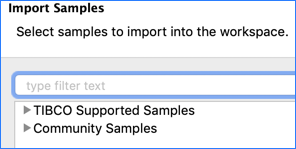
The same check box on the StreamBase Sample Importer dialog clones a separate set of samples contributed by the Spotfire Streaming community. These samples are monitored by Spotfire but not supported, and appear in a separate section of the StreamBase Sample Importer dialog:
Another category of samples are accessed with the > menu:
- StreamBase Component Exchange
-
The Component Exchange provides a set of StreamBase extensions and special case projects that are curated by Spotfire but not supported.
Finally, demonstration projects are found in the SB Demos perspective in StreamBase Studio:
- SB Demos Perspective
-
The SB Demos perspective provides a set of demonstrations of StreamBase and LiveView functionality in a self-running demonstration environment. See SB Demos Perspective.
To load a sample into StreamBase Studio:
-
From Studio's top-level menu, select >.
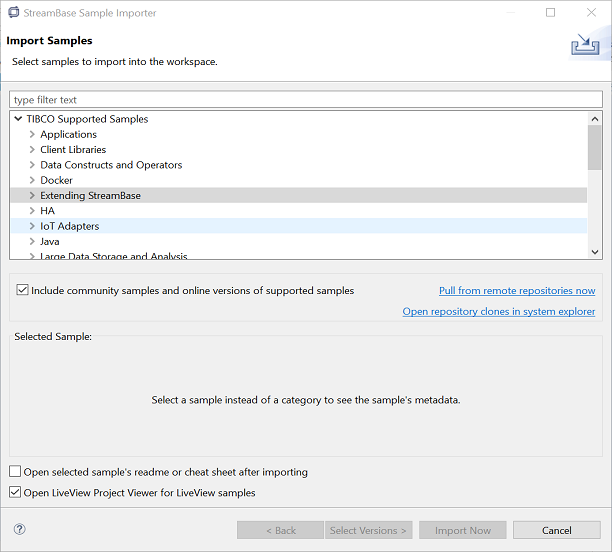
You can resize the dialog as needed.
-
The dialog first opens with all categories collapsed, as shown above.
To locate a sample of interest, you can:
-
Type a search string in the type filter text field.
-
Open the categories of interest and browse each list.
-
-
Select one or more samples from the Load Sample Projects dialog. While clicking, hold the Ctrl key (Windows) or command key (macOS) to make a multiple selection.
-
Specify whether or not to open the README.html, README.md, or Eclipse Cheat Sheet (if provided) for the selected samples. Studio remembers your setting of this option.
-
When opening a LiveView sample, specify whether to open the LiveView Project Viewer for the selected samples (recommended).
-
Click .
The samples you load have the following characteristics:
-
StreamBase Studio creates a separate project for each sample you load.
-
Exception: for the Operator sample group, Studio creates a single project and all the individual operator's sample modules are imported into the same project folder.
-
-
You can reload any sample any time. If your workspace already has a copy of that sample, Studio creates a new copy, appending a number to the new copy's project folder name. This lets you load several copies of the same sample to experiment in different ways.
-
The Load Sample Projects dialog remembers the collapsed or expanded state of the category lists.
You can enable and disable the GitHub content from the StreamBase Sample Importer dialog by selecting or clearing the Include community samples check box.
-
If you have never accessed the community samples on this computer for any Spotfire Streaming release, you see the following link below the list of samples:

The first time you enable this content, Studio prompts for license approval, then performs a git clone operation to place both supported samples and community projects into two local clone folders.
-
Thereafter, this section of the dialog looks like the following:

Once you have enabled the community samples, you can clear and re-select this checkbox to clear the GitHub content from appearing in the dialog. However, the local clone remains in place unless you explicitly delete it with system commands.
Click the Open repository link to go to the local clone if you need to. (A similar link is on the StreamBase Studio panel of Studio Preferences.)
- Pull to Update
-
Use the Pull from remote repositories now link to perform a git pull operation on your local clone folders to update them with any changes made on GitHub since your last clone or pull operation. The Pull from remote link also changes branches on the local clone to match the current Studio version.
- GitHub Release Tracks Studio Version
-
Studio uses the same local clone location for all Studio releases. This local repository uses the git branch feature to keep the local samples coordinated with the current Studio version.
When you install a new StreamBase release on a machine with a previous release, be sure to use the Pull from remote link to obtain the new and updated GitHub changes that match the new release.
The current StreamBase Studio version determines the GitHub branch that you pull from with the Pull from remote link. For example, if you have both Spotfire Streaming 10.5 and 10.6 installed, and you use the Pull from link in Studio 10.6, your local clone then has samples that match Spotfire Streaming 10.6.
The next time you return to Studio 10.5 (perhaps to maintain an existing application), use the Pull from remote link to reset the local clone's branch to match Spotfire Streaming 10.5.
- Open Markdown README
-
When importing samples from the GitHub repository, be sure to select the Open selected sample's readme check box, which causes the sample's Markdown README to be displayed on import into Studio. Starting with release 10.5.1, Studio directly opens and converts Markdown format files. In previous releases, Studio opened the project's README.html file (which was converted from the README.md file and saved in the project).
- Hierarchical Project Organization
-
Most Spotfire Streaming samples on GitHub are delivered as a pair: a fragment project plus a companion StreamBase Application project, together organized as a single hierarchical set project.
In Studio 10.6, the default view in the Project Explorer panel is the Hierarchical view. In this view, the containing set project shows above its two component projects. For example, the following shows the Docker Two-node EventFlow sample from GitHub in Hierarchical view:
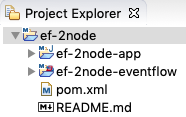
To see hierarchical projects in the flat view of previous Spofire Streaming releases, use the three-dot menu in the Project Explorer view's toolbar to select >:

Once you select either Flat or Hierarchical view setting, it remains active over successive Studio restarts until changed.
- Running GitHub Samples
-
Some sample projects from the GitHub repository are compatible with StreamBase Studio but are not necessarily designed to be Studio development projects. Such projects can be run from the command prompt with mvn install commands.
- Sample Versions
-
Use the Select Versions button to select among a sample's versions, if any are available.
The StreamBase Sample Importer dialog always imports samples, whether of local or GitHub origin, into the current Studio workspace. See Default Installation Directories for that location for your platform.
Do not try to run the local samples from their installed location, which is likely to be in a folder for which you do not have write access. Always import samples into Studio, and use the Studio workspace location, even if running them from the command prompt.
A small number of StreamBase samples, such as client and buffering, have C++ and Java code that can be modified and rebuilt. In order to rebuild the C++ executables on Windows, you must have one of the supported Microsoft Visual Studio versions installed as described on Supported Platforms.